Is 40 Minutes Enough for a Layover at DFW?
40-minute layovers at DFW can work for domestic flights if everything runs smoothly; avoid for international connections and allow 90–120+ minutes.

If you’re wondering whether a 40-minute layover at Dallas Fort Worth International Airport (DFW) is enough, here’s the short answer: it depends on the circumstances. For domestic-to-domestic flights, it’s possible but tight. DFW’s Skylink train helps by connecting all terminals in under 10 minutes, but factors like delayed arrivals, distant gates, or peak travel times can make it risky.
Here’s what you need to know:
- Domestic connections: 40 minutes is the airport’s official minimum connection time (MCT) and feasible if everything runs smoothly.
- International connections: Not enough time. Customs, immigration, and security rechecks require at least 90–120 minutes.
- Key risks: Flight delays, long distances between gates, and crowded Skylink trains during busy hours.
- Best practices: Travel with carry-ons, sit near the front of the plane, and use your airline’s app for real-time updates.
Bottom line: A 40-minute layover works for domestic flights under ideal conditions but leaves no room for error. For international arrivals or those needing extra time, aim for at least two hours.
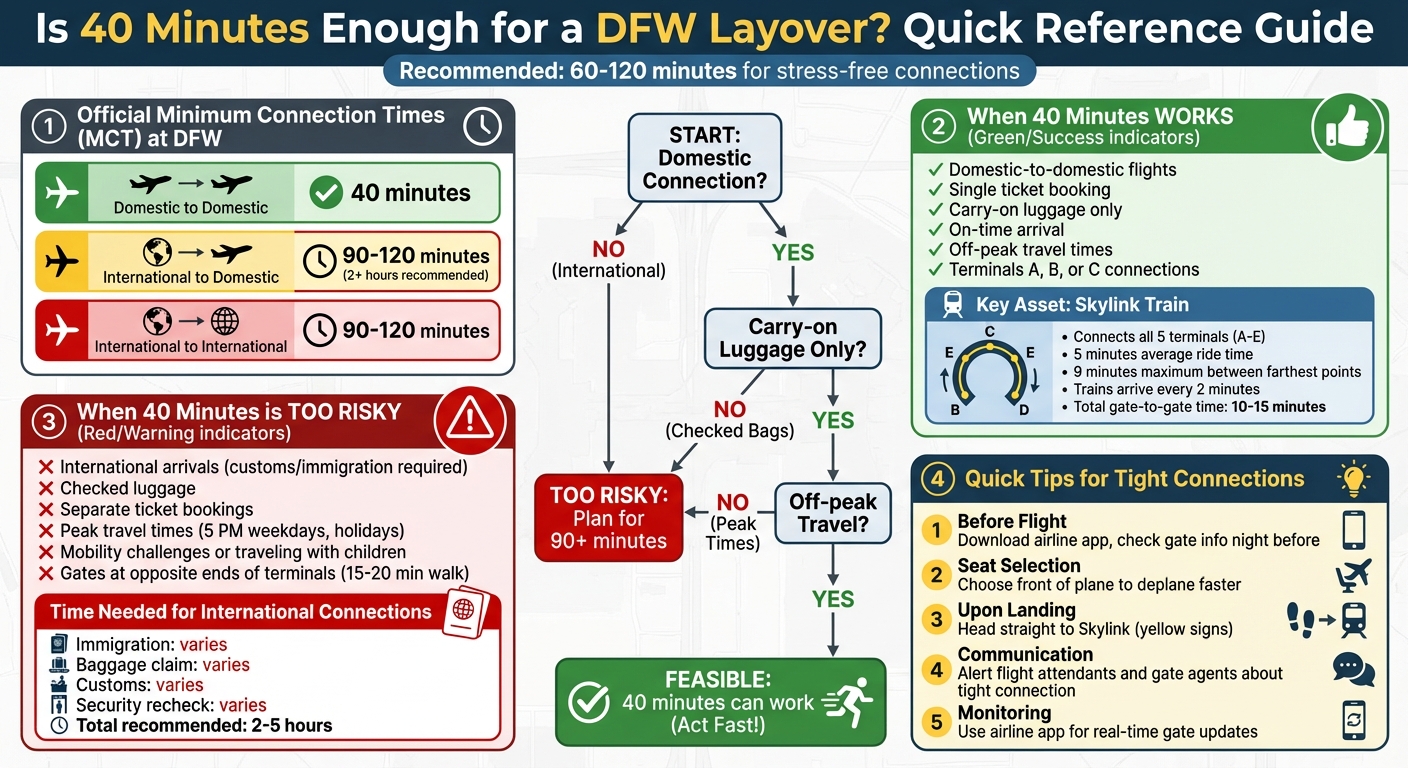
DFW 40-Minute Layover: Quick Reference Guide for Connection Times and Risk Factors
Making a connection @ DFW Dallas-Fort Worth Airport. Skylink, everything you need to know.
What Are Minimum Connection Times at DFW?
Minimum Connection Time (MCT) refers to the shortest amount of time airlines require between flights to ensure passengers can make their connections. This time is calculated from the scheduled arrival (wheels down) of your first flight to the departure of your next one. It accounts for deplaning, moving between gates - often using the Skylink - and completing any necessary security, customs, or immigration processes.
At Dallas/Fort Worth International Airport (DFW), MCTs depend on factors like the airport’s layout, walking distances, Skylink travel times, security protocols, and even historical delay patterns. The Skylink, which connects all terminals, plays a key role in making short connection times possible.
DFW's Official Minimum Connection Times
For domestic-to-domestic connections booked on a single ticket, the standard MCT at DFW is about 40 minutes, particularly for American Airlines, which operates the majority of flights at the airport. If your itinerary includes a 40-minute layover, it’s considered the baseline for domestic connections.
International connections, however, require more time. For flights involving U.S. customs and immigration, a connection window of 90–120 minutes is recommended. Many travelers prefer at least two hours to allow for clearing passport control, collecting and rechecking luggage (if needed), and passing through security again. These steps are mandatory when arriving from an international flight and connecting to a domestic one.
How Airlines Enforce MCTs
Airlines integrate MCT rules into their ticketing systems, which automatically block itineraries that don’t meet the required time. For example, American Airlines won’t sell a domestic-to-domestic connection at DFW with less than 40 minutes between flights if it violates the MCT for that route.
However, meeting the official MCT doesn’t guarantee you’ll make your connection. It simply means the itinerary is possible under normal conditions. Delays, slow deplaning, crowded Skylink trains, or long security lines can eat into that connection time. While many travelers successfully make 40-minute domestic connections at DFW when flights are on schedule, there’s little room for unexpected hiccups. Knowing how airlines apply these rules helps explain why such short layovers are feasible but come with some risk.
When a 40-Minute Layover Works at DFW
Domestic-to-Domestic Connections
DFW's setup makes 40-minute layovers manageable, especially for domestic flights on a single ticket. With most domestic routes operating out of Terminals A, B, and C, connecting gates are often either in the same terminal or just one terminal away. This close proximity significantly reduces transit time, thanks to DFW's thoughtful design and the convenience of the Skylink train.
DFW's Layout and Skylink Train
DFW's five terminals (A through E) are laid out in a horseshoe shape, with the Skylink train connecting all terminal centers. The train runs frequently, with an average ride time of about 5 minutes and a maximum of 9 minutes between the farthest points. Including walking and waiting times, you can typically get from one gate to another in 10–15 minutes, even if they’re in different terminals. This efficient system is a game-changer for tight connections.
What Makes a 40-Minute Layover Work
Making a 40-minute connection isn’t just about infrastructure - it also depends on how prepared you are. Traveling with carry-on luggage only saves time by skipping baggage claim and recheck steps. On-time arrivals are crucial; if your inbound flight lands and gets to the gate as scheduled, you’ll have the full 40 minutes to work with. Sitting near the front of the plane helps you deplane faster. Once off the plane, head directly to the Skylink station, check your gate assignment on the airline app during taxiing, and go straight to the correct platform without unnecessary stops. When everything aligns - timing, preparation, and focus - many travelers successfully complete 40–45 minute domestic connections at DFW without a hitch.
When a 40-Minute Layover Is Too Risky
International Arrivals and Customs
If you're arriving internationally, a 40-minute connection is almost out of the question. After landing, you'll need to clear immigration, retrieve any checked luggage, go through customs, and then re-clear TSA security. On average, this process takes anywhere from 60 to 90 minutes, and during busy periods, it can take even longer. Experts suggest allowing at least 2 hours for international-to-domestic connections at DFW, with some advising up to 5 hours to account for unpredictable lines and delays. With all these steps, a 40-minute layover simply isn't enough time.
Peak Travel Times and Delays
Late afternoons and evenings at DFW bring their own set of challenges. These are peak travel times, especially around 5 p.m. on weekdays and during holiday seasons. Crowds grow, the Skylink train may take longer due to increased demand, and security lines can stretch significantly. Even a minor flight delay of 10 to 15 minutes can completely eat up your connection time. Summer travel and holiday rushes only add to these complications, making tight connections even riskier.
Other Risk Factors
Certain factors make a short layover even more impractical. If you're traveling on separate reservations, airlines are unlikely to rebook you for free if you miss your connection. Mobility challenges or traveling with kids can also slow you down, making a 40-minute window virtually impossible to manage. Additionally, the distance between gates at DFW can be a major hurdle. Walking from one end of terminals A through D can take 15 to 20 minutes, and that's without factoring in the Skylink train ride. These logistical hurdles make a tight connection a gamble most travelers can't afford to take.
sbb-itb-d0f92e0
Tips for Managing Tight Layovers at DFW
When you’ve only got 40 minutes to make a connection, every second matters.
Plan Ahead for a Quick Transfer
Before you even board your first flight, download your airline's app - especially if you're flying with American Airlines. These apps provide real-time updates on gate changes for both your arriving and departing flights. Checking your connection details the night before can help you anticipate any potential delays. Once you're in the air, refresh the app periodically to stay informed about gate updates.
Choose a seat near the front of the plane to save precious minutes during deplaning. Frequent flyers swear by this tip, as it can mean the difference between catching or missing a tight connection. If your assigned seat is further back, check with the gate agent or a flight attendant to see if you can move closer to the front. These small adjustments can make a big impact on your layover experience.
Use the Skylink Train
The Skylink train is your go-to solution for navigating Dallas/Fort Worth International Airport (DFW) quickly. This automated train connects all four main terminals - A, B, C, and D - without requiring you to exit and re-clear security. Look for the yellow Skylink signs near your arrival gate; stations are conveniently located in the center of each terminal's horseshoe layout.
Trains arrive every 2 minutes, making them far faster than walking, which can take 20 to 30 minutes between distant gates. Many travelers have successfully made 40-minute domestic connections by heading straight to Skylink, even when moving between terminals like C and B. Just double-check the signs on the platform to ensure you're boarding the train heading in the right direction for your next terminal.
Talk to Airline Staff
If you're worried about making your connection, let flight attendants know about your tight schedule. They might be able to help by expediting the deplaning process or alerting gate agents to hold your connecting flight briefly.
Once you land, gate agents can be a valuable resource. They can guide you to the fastest Skylink route, provide live updates on your departing flight, or even contact the connecting gate to let them know you're en route. American Airlines, in particular, has systems in place at DFW to hold certain flights when possible. If your inbound flight is delayed, their app will notify you if your connection is being held and for how long. If you notice a delay before boarding your first flight, speak to a gate agent - they might rebook you on a later connection or flag your record as a tight connection to ensure smoother assistance.
For Dallas-Based Travelers: Using Joe's Flights

How Joe's Flights Can Help
If you're traveling from Dallas, Joe's Flights is a game-changer. The service keeps a close watch on fare drops from DFW and Dallas Love Field, sending you real-time alerts when prices take a nosedive. Plus, it highlights itineraries with tight DFW layovers, so you can snag a deal while staying informed about potential connection challenges.
Many of these discounted fares come with layovers as short as 40 minutes - the bare minimum. Knowing how to evaluate these connections is key. Joe's Flights provides the deals, but it's up to you to decide if the itinerary works for you. A free membership gets you limited alerts, while upgrading to the Premium plan unlocks unlimited, real-time updates.
Making Smart Decisions on Layovers
When you receive an alert featuring a tight DFW connection, it’s essential to compare it with the guidelines shared in this article. Domestic connections with gates close to each other are usually manageable, but international arrivals or flights during peak hours can add complications.
Joe's Flights helps you find the savings, but your judgment determines if the itinerary suits your travel style. Consider factors like timing, gate locations, and whether you're checking luggage. The service provides the deals, while your understanding of layover logistics ensures you make the best choice. With these tips, you’ll feel confident navigating DFW’s layover challenges.
Conclusion
A 40-minute layover at DFW can work for domestic connections - but only under ideal conditions. Airlines use this as the official Minimum Connection Time because it's technically feasible, not because it’s convenient or stress-free. Everything has to line up perfectly: your flight needs to land on time, deplaning must happen quickly, and Skylink has to run seamlessly. Even a small delay can wipe out your cushion.
The trick is to assess your itinerary and personal comfort with risk. If you’re traveling domestically on a single ticket, carrying only hand luggage, and flying during off-peak hours, your chances improve significantly. But for international arrivals with customs, checked luggage, or connections involving multiple airlines, you’ll want at least two hours - or more. Evening flights, which are more prone to delays, also call for extra buffer time. Before booking, take a close look at your itinerary. Stick to single-ticket bookings, limit yourself to carry-ons when possible, and aim for off-peak travel times to reduce stress.
DFW’s busy nature means delays and congestion are common. If you’re connecting to something critical - like a cruise, a major event, or the last flight of the day - adding extra time can save you a lot of worry.
If you’re stuck with a 40-minute layover, here’s what to do: sit as close to the front of the plane as possible, head straight to Skylink without delay, and keep a close eye on your airline app for updates. If all flights are on the same ticket, airlines will usually rebook you at no charge if you miss your connection.
For future travel, reserve 40-minute layovers for low-risk situations only. Whenever possible, aim for connections in the 60- to 120-minute range. A little extra time lets you grab a snack, use the restroom, and navigate the airport without rushing. And if you’re traveling with kids or have mobility concerns, building in a buffer is even more important to keep your trip stress-free.
FAQs
Is a 40-minute layover at DFW enough if I’m flying with different airlines?
A 40-minute layover at DFW Airport can feel like a race against the clock, especially when switching between airlines. Moving from one terminal to another often eats up precious minutes, and any delay can put your connection at risk.
To boost your chances of catching your next flight, start by checking if both flights are in the same terminal. If they’re not, make sure you're familiar with the Skylink train - it’s the fastest way to hop between terminals. For a less stressful journey, think about booking a longer layover whenever you can. It’s always better to have a little extra time than to find yourself sprinting through the airport.
What’s the best way to handle a short layover at DFW during busy travel times?
Navigating a short layover at DFW, especially during peak travel times, requires some smart planning. Start by ensuring your connection time aligns with the airport's minimum recommendations - at least 40 minutes for domestic flights is a good rule of thumb. Since DFW is massive, take a moment to familiarize yourself with its layout. The Skylink train, which connects all terminals, can be a lifesaver when you're racing against the clock.
Traveling light can also make a big difference. Keep your essentials - like travel documents - within easy reach to breeze through security checks or boarding. For added convenience, consider using the DFW Airport app. It provides real-time updates on gate changes and delays, helping you stay one step ahead. A little preparation can turn a potentially stressful layover into a smooth experience.
What are the best tips for navigating DFW quickly with kids or mobility challenges?
Traveling through DFW with kids or mobility challenges doesn’t have to be overwhelming if you plan ahead. If you or someone in your group needs extra support, make sure to request wheelchair assistance or other accessibility services ahead of time. DFW provides options to help make navigating the airport easier. For families, there are also play areas available to keep kids entertained during layovers.
To save time between terminals, hop on the Skylink train, which connects all terminals and runs every two minutes. If you’re traveling with strollers, car seats, or other bulky items, be sure to allow extra time for security and getting around the airport. A little preparation and taking advantage of these services can go a long way in reducing stress and helping you catch tight connections.
Related Blog Posts
Written by Joe's Flights. Spotted something cheaper? Tell us.