Ultimate Guide to Airport Apps for Dallas Flyers
Find the best apps for navigating Dallas airports—official airport and airline apps plus maps to manage parking, security wait times, and real-time flight updates.
Navigating Dallas airports - whether sprawling DFW or compact Love Field - can be simpler with the right apps. These tools help you manage parking, security wait times, flight updates, and even terminal navigation. Here's what you need to know:
- DFW Airport App: Ideal for DFW travelers. Features include real-time flight updates, parking reservations (up to 50% savings), security wait times, and interactive maps.
- Love Field App: Focused on essentials like flight tracking, parking info, and terminal maps.
- Airline Apps: Apps like American Airlines or Southwest Airlines enhance your journey with boarding passes, gate updates, baggage tracking, and more.
- Google Maps & Apple Maps: Great for indoor navigation and finding amenities at both airports.
Pair the DFW app with your airline’s app for DFW trips. For Love Field, use the airline app and Google Maps. Set up notifications and location access for real-time updates and a smoother experience. These apps save time, reduce stress, and ensure you’re always informed.
Best Airport Apps for DFW and Love Field
DFW and Love Field Official Apps
The DFW Airport app (available for free on iOS and Android) is a must-have for navigating one of the busiest airports in the country. It offers real-time flight updates, complete with push notifications for gate changes and delays, so you're always in the loop. The interactive terminal maps with turn-by-turn directions are especially handy for maneuvering through its five terminals. Plus, it provides live security checkpoint wait times, helping you plan when to arrive. Other features include parking tools that let you reserve a spot in advance and a directory of over 200 shops and restaurants, which even allows you to pre-order meals for added convenience.
One traveler shared how the app saved the day during a tight 30-minute connection, guiding them efficiently through trams and terminals. With a 4.6/5 rating on the App Store, users frequently praise its navigation features and overall ease of use.
The Love Field app, though simpler, is still a helpful resource for navigating Southwest Airlines' primary Dallas hub. It includes terminal maps, live flight boards, flight tracking, and parking details. While it doesn’t have as many features as the DFW app, it covers the essentials for a smooth experience.
Airline Apps for Dallas Travelers
Airline-specific apps can further enhance your travel experience. For those flying out of DFW, the American Airlines app provides digital boarding passes, real-time updates on gate changes, baggage tracking, and seat maps for upgrades. Pairing this app with the DFW Airport app can make your journey even more seamless.
At Love Field, the Southwest Airlines app offers similar conveniences, including mobile boarding passes, live gate updates, baggage tracking, and real-time flight alerts. These features ensure stress-free navigation through the terminal.
Indoor Navigation and Mapping Apps
If you prefer general mapping tools, apps like Google Maps and Apple Maps offer excellent indoor navigation for both DFW and Love Field. Google Maps provides detailed walking directions between gates, estimated travel times, and information about nearby restaurants, lounges, and shops. It also includes public transit schedules for getting to and from the airports.
Apple Maps delivers similar features, such as turn-by-turn walking directions and estimated travel times, all seamlessly integrated with iOS devices. This makes it a convenient option for pre-trip planning and on-the-go navigation.
Both apps are particularly helpful at DFW, where sprawling terminals can make distances between gates feel longer than expected. Whether you're grabbing a quick bite or rushing to your next flight, these tools ensure you stay on track.
How to Set Up and Use Airport Apps
Pre-Trip Setup Steps
To get started, download the DFW Airport app from the App Store (search for "Dallas/Fort Worth International Airport") or Google Play (look for "DFW Airport") at least a day before your trip. Make sure to also install your airline's app - whether it's American, Delta, United, or Southwest - by confirming the official publisher before downloading. Once installed, create your MyDFW account, link your TollTag (if you have one), and input details like your full legal name, date of birth, TSA PreCheck/Known Traveler Number, and frequent flyer information. This setup ensures that boarding passes and status benefits automatically sync.
Enable push notifications for both the DFW and airline apps to stay informed about parking updates, security wait times, flight delays, and gate changes. Add your upcoming flight by confirming its flight code, which will display critical information - like your gate, boarding time, and seat assignment - right on the app's home screen.
For the best experience, allow location access ("While Using the App") for both airport and mapping apps. This ensures accurate wayfinding and walking-time estimates. Don’t forget to connect to the airport’s free Wi-Fi for real-time updates and keep these apps on your home screen for easy access.
Once your apps are configured, you’ll be ready to navigate smoothly from parking to your departure gate.
Getting Through DFW: Parking to Gate
Before heading out, open the DFW app to prebook your parking. This can save you up to 50% compared to drive-up rates. Simply select your entry and exit dates, then choose your preferred lot or terminal garage. The app also provides real-time parking availability for terminal garages, remote lots, and express lots, helping you pick the best option based on your budget and walking distance. Follow the app’s directions to your designated parking spot for a hassle-free arrival.
After parking or being dropped off, check the app for security checkpoint wait times. This feature is especially useful during busy hours, like early mornings, so you can pick the fastest entrance. Once through security, use the app’s interactive map to enter your gate number and get turn-by-turn directions. Need to switch terminals? The app can guide you via Skylink, the airport’s terminal train system.
If you have time to spare, explore the app’s directory of over 200 shops and restaurants. Some locations even allow pre-ordering, so you can grab a quick coffee or meal before your flight. For boarding passes and real-time flight updates, rely on your airline’s app to stay on top of gate changes or other last-minute updates.
Navigating Love Field
Planning ahead at Love Field is just as important. Since most travelers here fly Southwest Airlines, the Southwest app becomes your go-to tool. Log in 24 hours before your flight to check in and secure an earlier boarding position. Save your mobile boarding pass and ensure your Rapid Rewards number is added so your points and status sync automatically.
Love Field’s single-terminal layout makes navigation straightforward. Use a mapping app like Google Maps or Apple Maps to review parking entrances and identify the best walking route from security to your gate. The Southwest app handles flight-specific details like boarding positions, gate updates, and delays, while your mapping app can help you locate nearby restaurants or services. Together, these tools make for a smooth and efficient travel experience.
Advanced App Features for Frequent Flyers
Setting Up Smart Notifications
If you’re a frequent traveler flying out of Dallas, setting up smart notifications in both the DFW app and your airline’s app is a game-changer. These notifications keep you informed about flight status updates, gate changes, boarding times, and even security wait times, helping you avoid unnecessary stress. With the DFW app, you can enable push notifications for real-time updates, so you’ll know right away if your flight is delayed, your gate changes, or boarding starts earlier than expected. The app also offers customizable options, allowing you to pick and choose which alerts you want to receive, making sure critical updates - like parking changes or long wait times at security - don’t slip through the cracks.
To keep things manageable, focus on enabling essential alerts like flight status changes, gate updates, and boarding reminders. At the same time, you can turn off less urgent notifications, like promotional messages, in both the airport and airline apps. If you’re a frequent flyer, consider using your phone’s notification settings to group all travel-related alerts into a single high-priority category. This way, only the most time-sensitive information grabs your attention on travel days.
With these settings in place, you can stay ahead of the curve and make each trip as smooth as possible.
Making the Most of Terminal Time
The DFW app is your go-to tool for navigating the airport’s 200+ shops, restaurants, and services. Whether you’re craving a specific coffee shop, searching for a quiet spot to relax, or need to grab a quick bite, the app helps you find what you need without wandering aimlessly through the terminal. Even better, you can pre-order meals from select restaurants, allowing you to skip the line and grab your food on the way to your gate - perfect for tight connections or when time is limited.
Pair these features with instant boarding alerts, and you can plan your time efficiently, whether it’s for food pickups, restroom stops, or even a quick lounge visit. For layovers of 45 to 90 minutes, look for seating areas near power outlets or business services to stay productive. Set a reminder 15–20 minutes before boarding to ensure you have enough time to get back to your gate without rushing. If you need help navigating, apps like Google Maps provide detailed walking times and location info, giving you an extra layer of convenience.
Using Joe's Flights with Airport Apps
Once you’ve optimized your app settings, take your travel planning up a notch by integrating Joe's Flights. This service specializes in sending alerts for unbeatable flight deals from Dallas airports (DFW and Love Field), making it a valuable addition to your travel toolkit. For example, recent fare alerts have included $89 flights to New York City - deals that are hard to resist.
After booking a flight through Joe's Flights, you can input your travel details into the DFW and airline apps to streamline your day-of-travel experience. These apps can help you manage parking, check security wait times, pre-order meals, and even provide turn-by-turn directions to your gate. By combining the cost-saving power of Joe's Flights with the operational features of airport and airline apps, you can handle every step of your journey with ease - from booking to boarding.
sbb-itb-d0f92e0
App Now Shows Travelers DFW Airport Security Wait Times
Airport App Comparison for Dallas Flyers
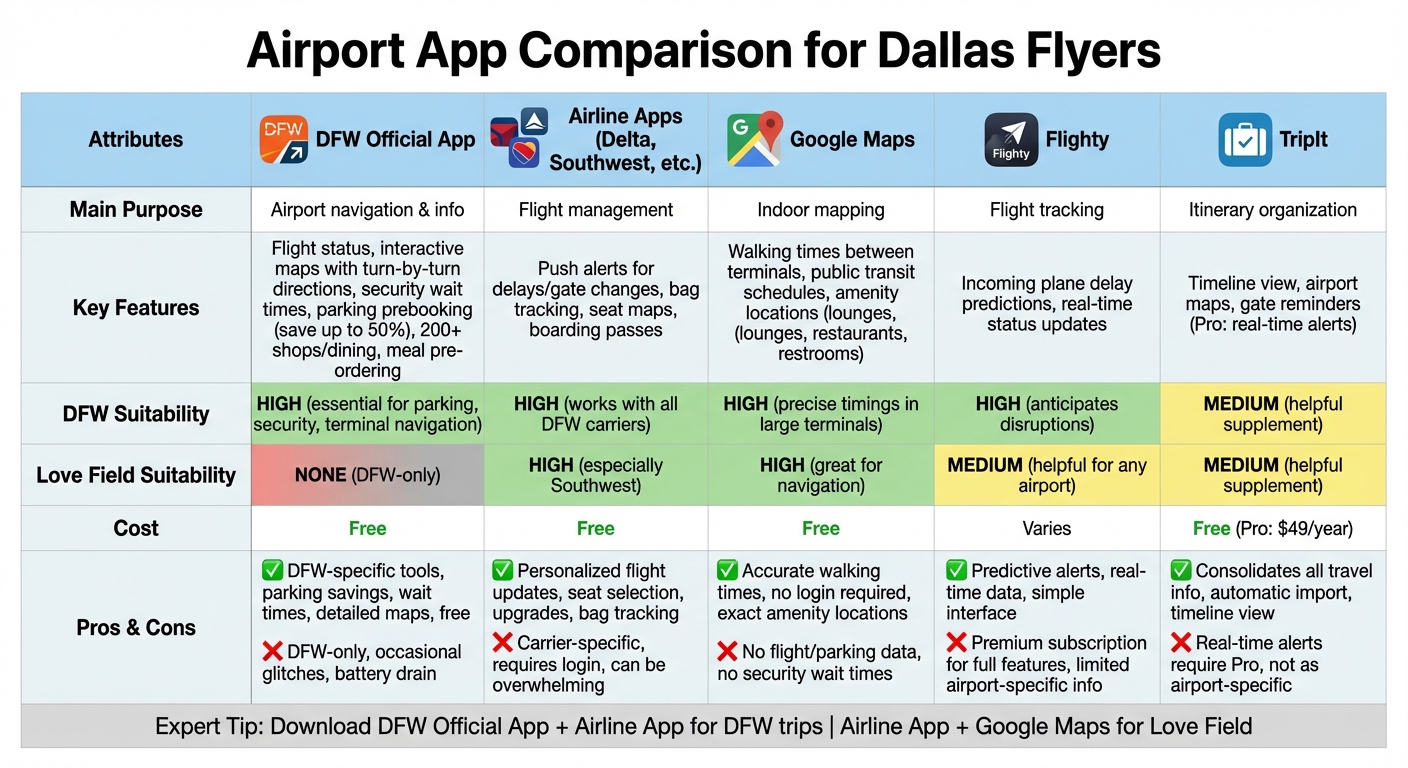
Dallas Airport Apps Comparison: Features, Suitability and Cost Guide
This guide is all about making your experience at Dallas airports as smooth as possible. Here's a breakdown of the top apps to help you navigate and manage your trips effectively.
App Features Comparison Table
Choosing the right app depends on your departure airport and the features you need. The table below highlights some of the best tools available.
| App Name | Main Purpose | Key Features | DFW Suitability | Love Field Suitability | Cost |
|---|---|---|---|---|---|
| DFW Official App | Airport navigation & info | Flight status updates, interactive maps with turn-by-turn directions, security wait times, parking prebooking (save up to 50%), search for 200+ shops/dining options, meal pre-ordering | High – essential for parking, security, and terminal navigation | None – DFW-only | Free |
| Airline Apps (Delta, Southwest, etc.) | Flight management | Push alerts for delays/gate changes, bag tracking, seat maps, boarding passes | High – works with all DFW carriers | High – especially useful for Southwest at Love Field | Free |
| Google Maps | Indoor mapping | Walking times between terminals, public transit schedules, amenity locations (lounges, restaurants, restrooms) | High – precise timings in large terminals | High – great for navigation | Free |
| Flighty | Flight tracking | Incoming plane delay predictions (e.g., DFW inbound impacts), real-time status updates | High – anticipates disruptions | Medium – helpful for any airport | Varies |
| TripIt | Itinerary organization | Timeline view, airport maps, gate reminders (Pro version adds real-time alerts) | Medium – a helpful supplement | Medium – a helpful supplement | Free (Pro: $49/year) |
The DFW Official App stands out for its exclusive features tailored to DFW travelers. On the other hand, Love Field passengers will find airline apps and Google Maps more practical for their needs.
Pros and Cons of Top Apps
Here's a closer look at the strengths and drawbacks of each app for Dallas flyers:
| App | Pros | Cons |
|---|---|---|
| DFW Official App | Packed with DFW-specific tools like parking savings, wait times, and detailed maps; free to use | Limited to DFW; occasional glitches and can drain battery life |
| Airline Apps | Offers personalized flight updates, seat selection, upgrades, and bag tracking | Carrier-specific; requires login; can feel overwhelming for casual travelers |
| Google Maps | Provides accurate walking times, no login required, and shows exact amenity locations | Doesn't integrate flight or parking data; lacks security wait time information |
For the best experience, experts suggest downloading both the DFW Official App and your airline's app when flying out of DFW. If you're departing from Love Field, pairing your airline's app with Google Maps is a solid choice to navigate the airport efficiently.
Conclusion
Navigating Dallas airports doesn't have to be a hassle when you have the right apps on your phone. For travelers flying through DFW, the DFW Official App is a must-have. It allows you to prebook parking, check real-time security wait times, and access interactive terminal maps - all tools that save time and reduce stress during your journey . Pair it with your airline's app to manage mobile boarding passes and receive instant updates on gate changes. Over at Dallas Love Field, combining your airline's app (especially Southwest’s) with a reliable mapping app for quick directions will usually cover everything you need.
Setting up these apps is quick and easy but makes a huge difference when it comes to the efficiency of your trip. Before you head out, download and log in to the apps, enable push notifications for flight updates, add your upcoming trips, and turn on location services to make the most of interactive maps .
Once you’re all set, these tools work seamlessly together to simplify every step of your travel experience. For example, imagine landing at DFW with a tight connection - your airline app alerts you to a gate change, while the DFW app guides you to the fastest route through the terminal .
And for those who love a good deal, Joe's Flights can help you snag amazing fares from Dallas airports before you even start planning. Whether it’s an $89 flight to New York City from Love Field or a $440 ticket to Rome from DFW, you can book the deal quickly and add the trip to your airline app for a smooth travel experience.
FAQs
How can the DFW Airport app help me save time and money while traveling?
The DFW Airport app is your go-to companion for a more seamless travel experience. With features like real-time flight updates, security wait times, and parking availability, it helps you plan efficiently and avoid unexpected hiccups.
Turn on notifications to stay updated on gate changes and flight delays, ensuring you're always in the loop. The app also lets you compare parking options, helping you find the best fit for your budget and convenience. Looking for discounted airfare? Check out cheap flight alerts from Joe's Flights, which tracks top deals departing from Dallas airports.
What are the top apps to help navigate Love Field efficiently?
Navigating Love Field can be a breeze if you’ve got the right apps in hand. Start with the Love Field Airport app, which keeps you updated on flight schedules, provides terminal maps, and even shows parking availability in real time. Combine this with tools like Google Maps for precise directions and Waze to dodge traffic on your way to or from the airport. If you’re a Dallas-based traveler, don’t miss out on Joe’s Flights - it’s perfect for spotting cheap flight deals from Love Field and other nearby airports.
How can I set up flight deal notifications on my phone?
To get started with flight deal notifications, simply subscribe to Joe's Flights alerts by providing your email. After confirming your subscription, you'll receive real-time updates on price drops and deals from Dallas airports (DFW and Love Field) straight to your inbox.
Be sure to enable notifications for your email app on your phone. This ensures you'll be instantly informed about the latest flight deals - no need to constantly check manually.
Related Blog Posts
Written by Joe's Flights. Spotted something cheaper? Tell us.